
MarketBeam Onboarding Process: A Complete Guide to Seamless Setup, Support, and Social Media Management Onboarding a social media management tool should be a smooth and hassle-free process. MarketBeam ensures this by offering a streamlined onboarding experience, comprehensive training, 24/7 technical support, and regular platform updates. This blog will walk you through the MarketBeam onboarding process, detailing how we prioritize client support and continuous platform improvements.
1. How Long Does Onboarding Take for MarketBeam?
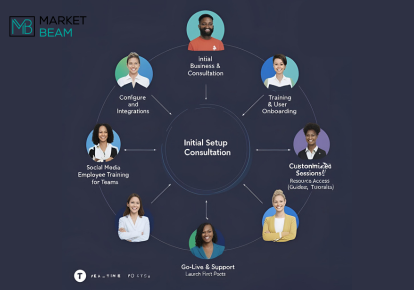
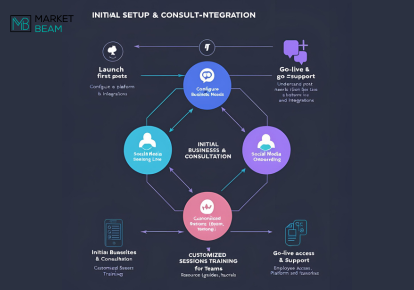
MarketBeam’s onboarding process is designed to be efficient and client-friendly. Typically, the onboarding process is completed within 2 to 4 weeks, depending on your business’s unique requirements and integration complexities. The key stages of the onboarding process include:
- Initial Consultation: Understanding your business needs and objectives.
- Platform Setup: Configuring the MarketBeam tool for your specific use case.
- Training Sessions: Guiding your team through the tool’s features with dedicated social media employee training.
- Go-Live Support: Ensuring a smooth transition to active usage.
2. Vendor Support and Training
MarketBeam provides comprehensive training and customer support throughout the onboarding process and beyond. Here’s what you can expect:
- Dedicated Account Manager: An expert who guides you from onboarding to implementation.
- Customized Training Modules: Tailored sessions to meet the unique needs of your team, especially for marketing onboarding.
- Resource Library: Access to detailed guides, FAQs, video tutorials, and product documentation.
- Q&A Support: Interactive sessions to resolve doubts and provide expert insights.
This ensures that even non-technical users can easily understand and utilize MarketBeam’s features effectively.
3. 24/7 Technical Support for Urgent Issues
In today’s fast-paced digital landscape, 24/7 technical support is crucial for addressing urgent issues. MarketBeam offers round-the-clock support through multiple channels:
- Live Chat: Immediate assistance for critical concerns.
- Email Support: Fast responses for general queries and troubleshooting.
- Support Portal: A dedicated space to raise, track, and manage support tickets efficiently.
Our support team is committed to resolving issues promptly, ensuring minimal disruption to your social media management activities.
4. How Often Does MarketBeam Update the Platform?
MarketBeam prioritizes continuous enhancement and platform updates. We conduct quarterly updates to ensure the platform stays ahead of market trends and remains compliant with regulatory requirements. Each update focuses on:
- Feature Enhancements: Adding new tools to enhance functionality.
- Security Improvements: Keeping your data secure.
- Performance Optimization: Enhancing user experience and system efficiency with UX design improvements.
5. Regular Product Improvements and New Features
MarketBeam believes in evolving with client needs and market trends. Our commitment to product improvements and feature updates is driven by client feedback and industry advancements. Clients can expect:
- New Feature Rollouts: Based on market research and client feedback.
- Performance Enhancements: Continuous efforts to streamline processes and boost productivity.
- Client Feedback Loop: Regular surveys and feedback sessions to align improvements with user expectations.
6. Enhancing Social Media Post Sharing with MarketBeam
MarketBeam simplifies social media post sharing with features designed for ease and flexibility:
- Choosing Social Media Post Sharing Preferences: Employees can select how they wish to share company-created content on their networks, ensuring alignment with personal branding.
- Auto-Sharing Social Media Posts: Employees can pre-approve posts for automatic publishing on platforms like LinkedIn and Twitter. This helps in maintaining consistent content flow without manual intervention.
- Sharing Posts from Email Notifications: MarketBeam notifies employees via email when a new post is ready. Users can simply click and share, ensuring timely engagement.
- Sharing Posts from Stories Page: Employees can conveniently share content by accessing the stories page, ensuring that only relevant and timely posts are published.
- Customizing Social Posts: Before sharing, employees have the flexibility to customize posts created by their admins, ensuring the message aligns with their voice and audience.
These features ensure a seamless and efficient content-sharing experience, enhancing overall social media engagement.
7. Managing Users and Groups in MarketBeam
Efficient user management is key to successful social media operations. MarketBeam provides robust user and group management features:
- Invite Users: Enhance organic reach by inviting users, including executives, to amplify content across social platforms.
- Re-invite Users: Re-invite users who haven’t yet joined MarketBeam or connected their social accounts.
- Bulk Re-invite Inactive Users: Simplify the process by bulk re-inviting inactive users to ensure maximum engagement.
- Delete a User: Easily remove users, such as when an employee leaves the company.
- Assign Admin Privileges: Grant admin access to users for efficient team management.
- Granting Executive Permissions: Simplify content management for executives by granting appropriate permissions.
- Managing User Groups: Create and manage user groups for streamlined content distribution.
- Creating User Groups Based on Time Zones: Optimize collaboration by grouping users based on their geographical locations.
- Amplifying Posts via User Groups: Select specific groups to amplify posts, ensuring wider reach and engagement.
8. Optimizing Team Settings and Content Management
- General Team Settings: Administrators can configure parameters affecting social media publishing, employee amplification, and result tracking.
- Users & Notifications: Ensure security with mandatory password renewals every 90 days.
- Email Notifications: Employees can opt for notifications about new posts to stay updated.
- UTM Builder: Set UTM parameters for tracking and analytics under Team Settings > Integrations.
- Earned Media Value: Track the monetary value of organic traffic to measure campaign success.
- Custom Short URL for Posts: Create custom branded URLs to enhance post branding and tracking.
- Content Type Tags: Categorize and manage different post types for better organization.
- Topic Tags: Organize content around specific topics for targeted communication.
- Post Signatures: Configure post signatures similar to email signatures for consistency and professionalism.
These settings ensure a comprehensive and well-managed approach to social media content creation and distribution.
Why Choose MarketBeam for Social Media Management?
- User-Friendly Interface: Designed for easy navigation, even for non-technical users.
- Dedicated Support: Ongoing assistance throughout your journey with MarketBeam.
- Reliable and Scalable: Suitable for businesses of all sizes.
- Affordable Plans: Competitive pricing with no compromise on features or support.
Conclusion
MarketBeam’s onboarding process is designed to empower businesses with a smooth transition, extensive training, and 24/7 technical support. With regular platform updates and feature enhancements, MarketBeam ensures that clients always stay ahead in the competitive landscape of social media management.